Fake Telegram chat generator: screenshots you can’t tell from real
Small things give a fake away: every message at 3 a.m. and a 100% battery. Here every detail is adjustable — the chat is ready in a minute.
- 242 screenshots downloaded this week
- Build and preview for free, no sign-up
- Clean chat — $1 for 10 screenshots, the first one is free
- Desktop, phone and Telegram
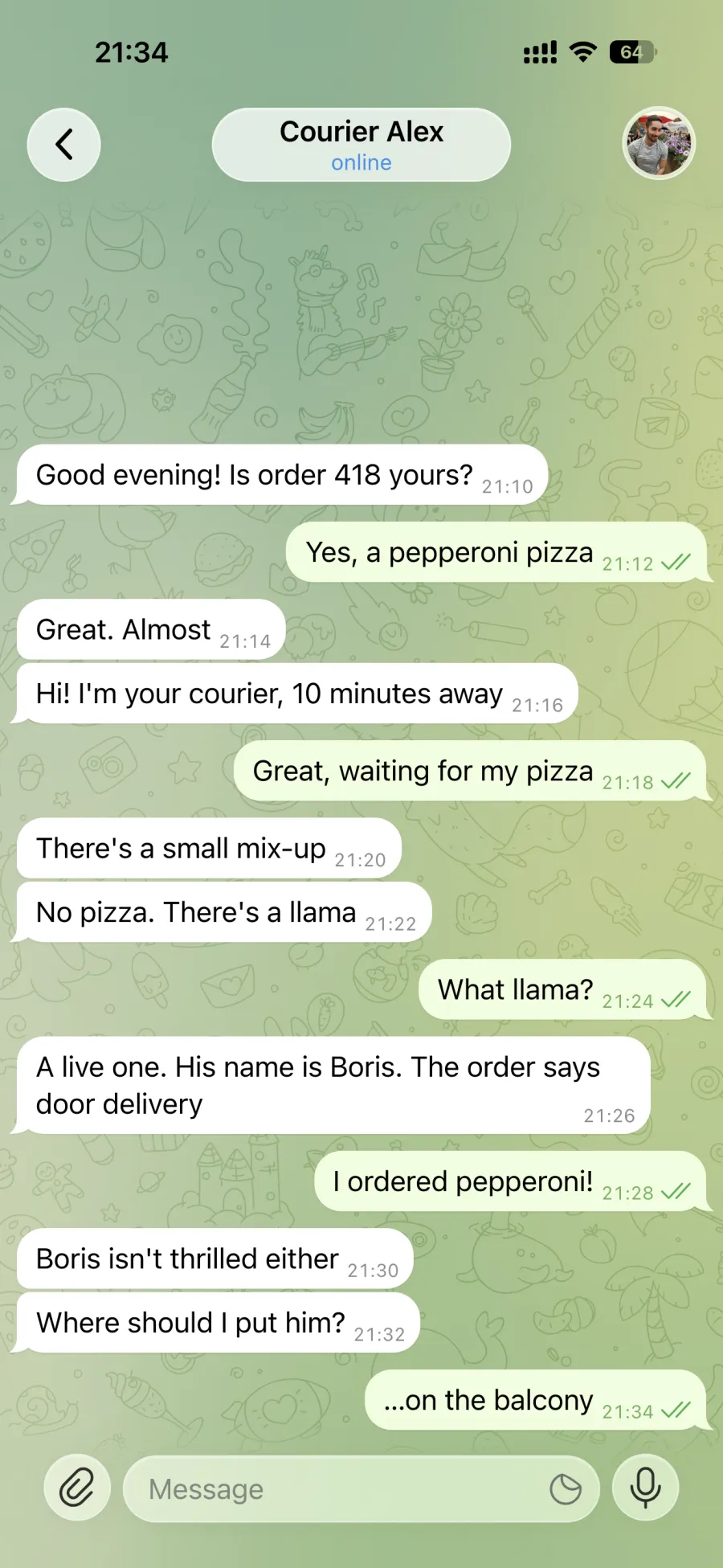
What it is
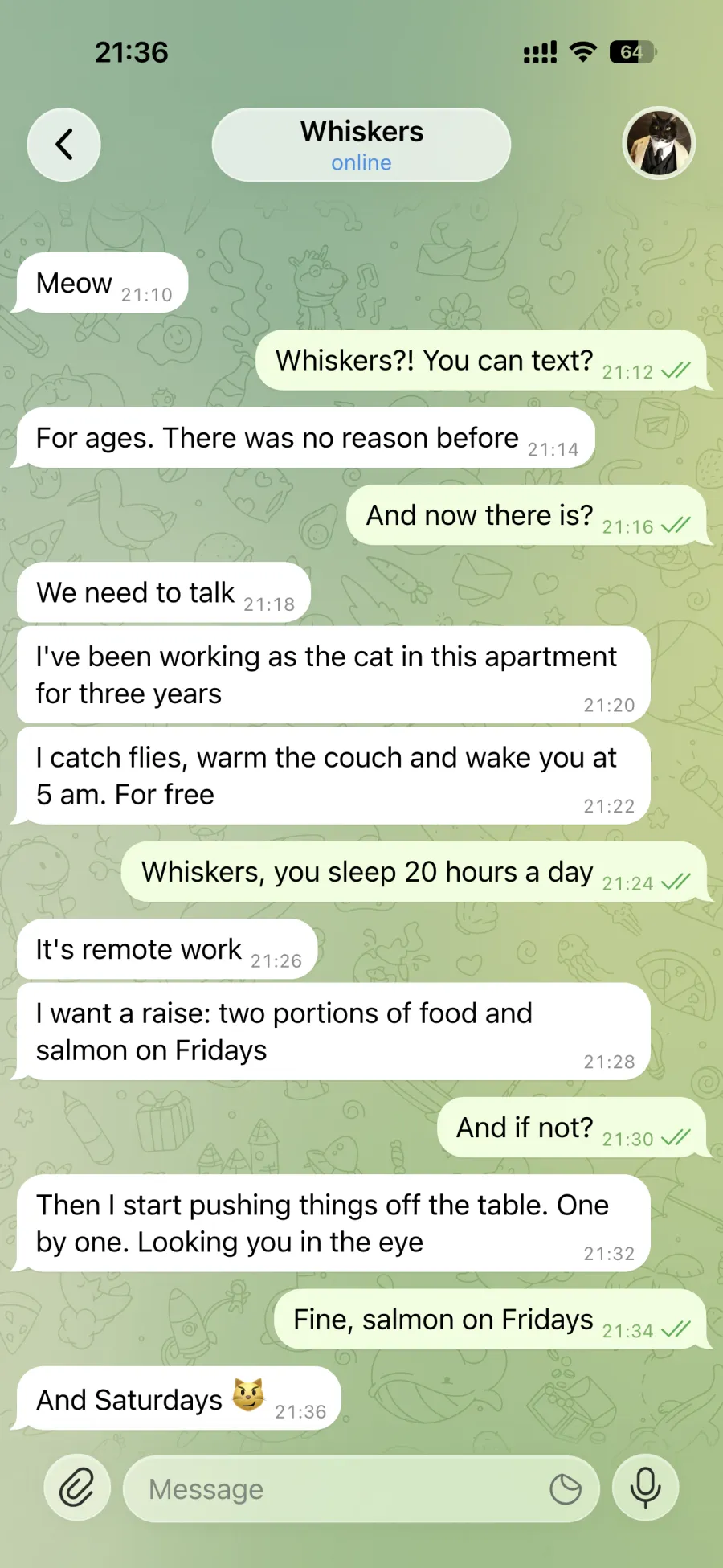
Fakegram is an online Telegram-style chat builder. You write messages for both sides, pick the contact’s name, photo and status, choose a theme and wallpaper, and the service draws the chat screen the way it looks in Telegram on an iPhone. Download the result as a PNG screenshot or as a video.
It is made for memes, short videos, illustrations and mockups. It runs in the browser on desktop and mobile, with nothing to install. The interface is available in Russian, English and Spanish. Telegram style is available now; WhatsApp is planned.
What you can set in the generator
| Detail | What changes |
|---|---|
| Contact | First and last name, photo or coloured initial, “online”, “typing…”, “last seen” statuses, a status icon, the mute icon. “Random” picks a name and photo for the region and gender you choose. |
| Messages | From both sides: formatted text with spoilers (up to 4096 characters), up to 10 photos, voice messages, calls, files, stickers, reactions. |
| Time and dates | Each message has its own time; date separators between messages. |
| Labels | Read ticks, “edited”, “forwarded”, the “Unread Messages” divider. |
| Status bar | Time, battery level and mode, signal, Wi-Fi or cellular, Dynamic Island, screen-recording indicator. |
| Look | Light and dark mode, Telegram themes and wallpapers, pattern, your own wallpaper, text size. With Telegram themes the background shifts with each message you send — just like in the app. |
| Emoji and stickers | Telegram packs — by link. |
| Video | The chat scrolls as if under a finger, pausing on the messages you mark; MP4 file. |
| AI and translation | AI writes the dialogue from a description (Ultimate plan); message translation after sign-in. |
| Account | Templates, saved contacts, undo and redo; after sign-in — on any device. |
| Phone | The editor works like a messenger; the site can be added to the home screen. |
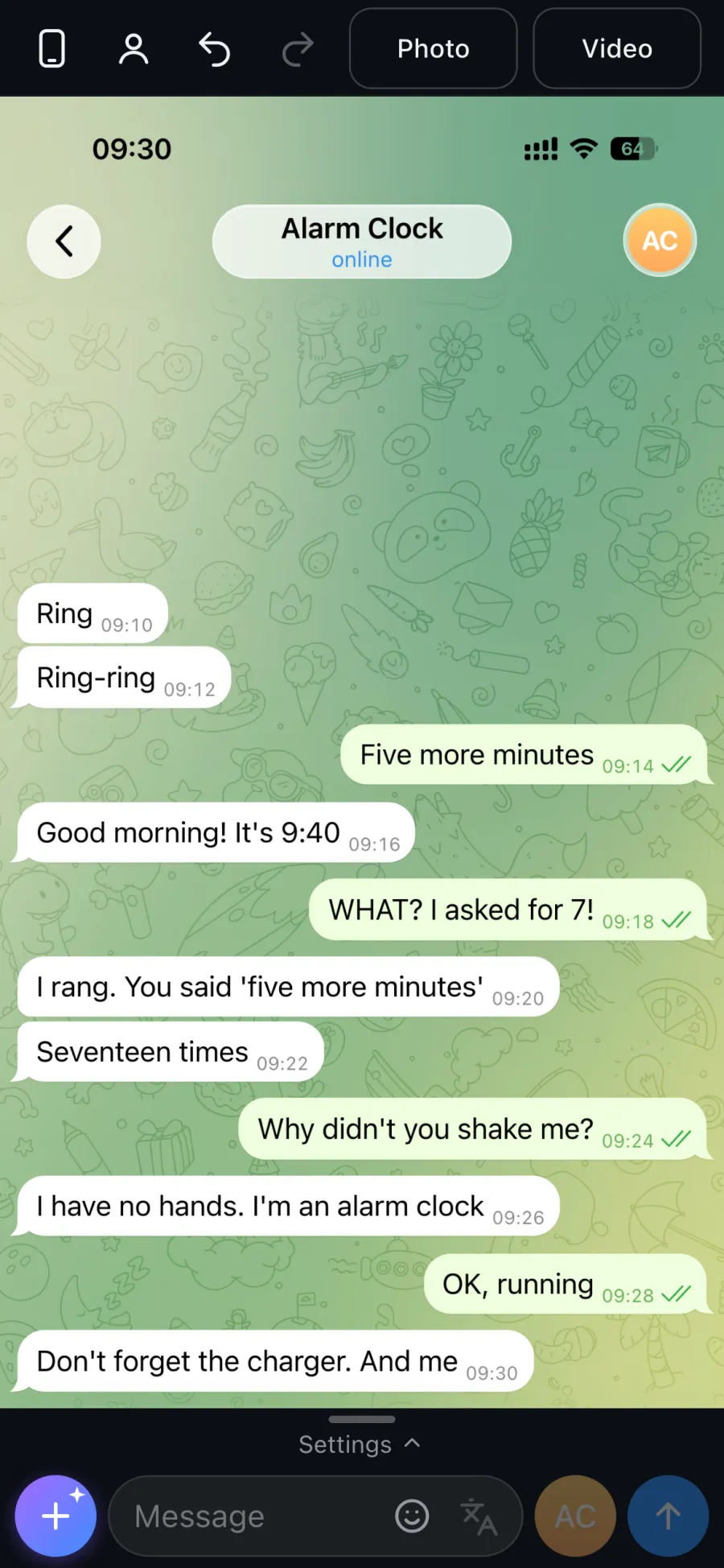
How to make a Telegram chat screenshot in a minute
- Open tg.fakegram.org on a computer or phone — nothing to install.
- Set the contact: name, photo, status. Or choose “Random”.
- Type the messages: write the text and send it from the contact or from yourself. The “+” button adds a photo, voice message, call, file, sticker or date.
- Adjust the look: theme, wallpaper, clock and battery in the status bar.
- Tap “Photo” to download a screenshot or “Video” to record a clip. Downloading requires signing in and tokens or a subscription.
What gives a fake screenshot away — and how to avoid it
- Every message at the same minute. Each message has its own time: real replies come a minute or two apart, not in the same second.
- A status-bar clock earlier than the last message. The time at the top should not be earlier than the last reply — in a new chat Fakegram sets the clock from the last message until you set it by hand.
- Times that are too even or go backwards. A real chat looks like 20:14 → 20:31 → 20:32: uneven gaps, never out of order.
- A frame that is too tidy. A real screenshot catches the middle of a conversation: scroll so the top message is cut off — the screenshot keeps exactly that scroll.
- A 100% battery in the middle of the night. Set a charge that looks like the end of the day — 30–70%.
- An empty header. Give the contact a photo or a coloured initial and a “last seen recently” or “online” status.
- Perfect grammar. Real people text short, skip the final full stop and type “lol”.
Fakegram or Photoshop
| What | Fakegram | Photoshop |
|---|---|---|
| Time per screenshot | about a minute | tens of minutes |
| Skills | none needed | required |
| Fonts, bubbles, spacing | as in Telegram on iPhone | matched by hand |
| Time, battery, statuses | picked in settings | drawn by hand |
| Chat video | the “Video” button | editing in another app |
What people use it for
- Memes and jokes for friends and social media.
- TikTok, Reels and Shorts: text stories, scary chats, sketches.
- Illustrations for articles, posts and tutorials — with no real personal data in the picture.
- Mockups for designers and marketers: how a bot message, a newsletter or a support flow will look in a chat.
- Storyboards for writers, props for films and music videos.
- Digital-literacy lessons: what a scam message looks like and what to check.
The service is made for entertainment, creative work and mockups.
Pricing
- In short: building and previewing is free with no sign-in (the preview carries a watermark); one chat is $1 for up to 10 screenshots, the first screenshot after sign-in is free; a video is $3.
- Tokens: $1 per token. 1 token = one chat, up to 10 screenshots; a chat is the contact and the chat design: change the name, avatar, theme or wallpaper and it is a new chat, while messages can be added and edited freely. A video = 3 tokens ($3). Packs of 4, 6, 9 and 12 tokens; the smallest purchase is 4 tokens ($4). Tokens never expire.
- Standard: $20 for 1 month, $55 for 3 months, $100 for 6 months. 200 chats a month — up to 2,000 screenshots; a video takes 3 chats (up to 66 videos a month). The unused part of a month does not carry over.
- Ultimate: $55 for 1 month, $150 for 3 months, $250 for 6 months. Downloads without counters (with a daily cap against abuse), a watermark-free preview, AI-written dialogues, chat import and export as a file.
- Downloaded screenshots and videos have no watermark on any plan.
- One plan covers both the site and the Fakegram bot in Telegram.
- Payment: cryptocurrency or CryptoBot, priced in US dollars; SBP for payments in rubles. Subscriptions do not renew automatically: each term is paid separately.
Current pricing: fakegram.org/en/tariffs
Acceptable use
Everything made in Fakegram must be a fictional mockup and must not be presented as real events.
Using the service for fraud, defamation, blackmail, pressuring or misleading people is prohibited. Do not present a generated chat as real or submit it as evidence. Do not use real people’s names or photos without their consent.
Fakegram is not affiliated with Telegram and is not an official Telegram product.
Full terms: fakegram.org/en/terms-of-use
FAQ
How do I make a fake Telegram chat for a meme or a video?
Open tg.fakegram.org, set the contact, type messages for both sides and tap “Photo”. The chat screen is drawn as you type, so you see the result before downloading.
Will the screenshot look like real Telegram?
Yes. Fonts, bubbles, spacing, the header and the status bar follow Telegram on an iPhone — by eye you cannot tell it from a real one. Passing it off as a real chat is not allowed — see “Acceptable use”.
Is Fakegram free?
Building a chat and previewing it is free; the preview carries a watermark. After you sign in, your first watermark-free screenshot is on us. After that, downloads are paid: 1 token costs $1 and covers one chat — up to 10 screenshots with the same contact and design. The smallest pack is 4 tokens ($4). Tokens never expire.
Do I need to sign up?
Not to try it. To download you sign in: press “Start” in the bot, confirm the sign-in with a button and return to the site. There is no password, and the service never sees your phone number and keeps only your Telegram ID and name. The sign-in bot may send reminders (for example, before a subscription ends); turn them off with /off.
Is there a watermark on the screenshot?
No. Downloaded screenshots and videos are clean. The watermark appears only in the on-screen preview, and the Ultimate plan removes it there too.
Can I make a Telegram chat video?
Yes. The “Video” button records a clip in which the chat scrolls as if under a finger, and you can mark messages to pause on. One video costs 3 tokens ($3). Recording happens in the browser — Chrome, Edge, Safari or Firefox — and the file is saved as MP4.
Does it work on a phone?
Yes, in the browser on iPhone and Android, where the editor works like a messenger. You can add it to your home screen: in Safari use Share → Add to Home Screen, in Chrome open the browser menu → “Add to Home screen”.
Will the screenshot look like iPhone or Android?
Like Telegram on an iPhone, with the iOS status bar and Dynamic Island. You can build it from any device.
Can AI write the conversation for me?
Yes, on the Ultimate plan. Describe the topic and the number of messages, and the AI writes a new dialogue or continues yours. You can edit every line afterwards.
Can I add voice messages, calls, stickers and reactions?
Yes. A chat can contain photos, voice messages, calls, files, stickers and reactions. Telegram sticker and emoji packs are added by link.
Can I change the date, time and “last seen” status?
Yes. Each message has its own time, dates go between messages, and the contact’s status uses the same options as Telegram: “online”, “typing…”, “last seen recently” and others.
How much are the subscriptions?
Standard is $20 a month: 200 chats (up to 2,000 screenshots) or 66 videos. Ultimate is $55 a month: downloads without counters (there is a daily cap), a watermark-free preview, AI dialogues, chat import and export as a file. Three- and six-month terms cost less per month. One plan works on both the site and the Fakegram bot.
Do you store my chats?
Without sign-in your chat is kept in your browser; the server receives it only to draw the preview, and preview images stay in a cache for up to 7 days. Uploaded photos are kept for up to 90 days after they were last opened. After sign-in your chat, templates, contacts and avatars are kept in your account so they open on any device; they are deleted after 60 days with no visits and no active subscription. Downloaded screenshots and videos are not stored. Server backups are kept for up to a week. AI requests and translation are processed by an external AI service. You can delete your account data yourself: Account → “Your data” → “Delete my data”; preview images and backups disappear on their own within a week, payment and sign-in records are kept for 12 months.
Is it legal to make a fictional Telegram chat?
A fictional chat for a joke, a video, an illustration or a mockup is generally not prohibited in itself, but rules depend on the laws of your country. It becomes unlawful when the image is passed off as real in order to mislead someone: to get money, defame a person, pressure someone or submit it as evidence. Responsibility lies with whoever does that. Do not use Fakegram for such purposes, and do not use real people’s names or photos without their consent.
How is the site different from the Fakegram bot?
On the site the chat is built on screen and you see the result at once; video is recorded here too. The bot is handy when you need a screenshot right inside Telegram. They share tokens and the subscription; a token started on the site is used up on the site.
Is there a Telegram bot for fake chat screenshots?
Yes, Fakegram has its own Telegram bot that makes a screenshot right in the chat. On the site you see the whole chat while you build it, and video is recorded here too. The site and the bot share one plan and tokens.
How can you tell a real screenshot from a built one?
From the picture alone, hardly at all: fonts and bubbles match Telegram. The only reliable check is to ask to see the chat in the app or to have the message forwarded. A screenshot on its own is not proof.
Is Fakegram affiliated with Telegram?
No. Fakegram is an independent service and is not affiliated with or endorsed by Telegram.
Contacts
- Website: fakegram.org/en
- Telegram bot: t.me/FGram_tgBot
- News: t.me/Fakegram_News
- Support: t.me/FakegramHelper