Telegram prank chat: how to prank a friend with a chat that never happened — 12 ideas
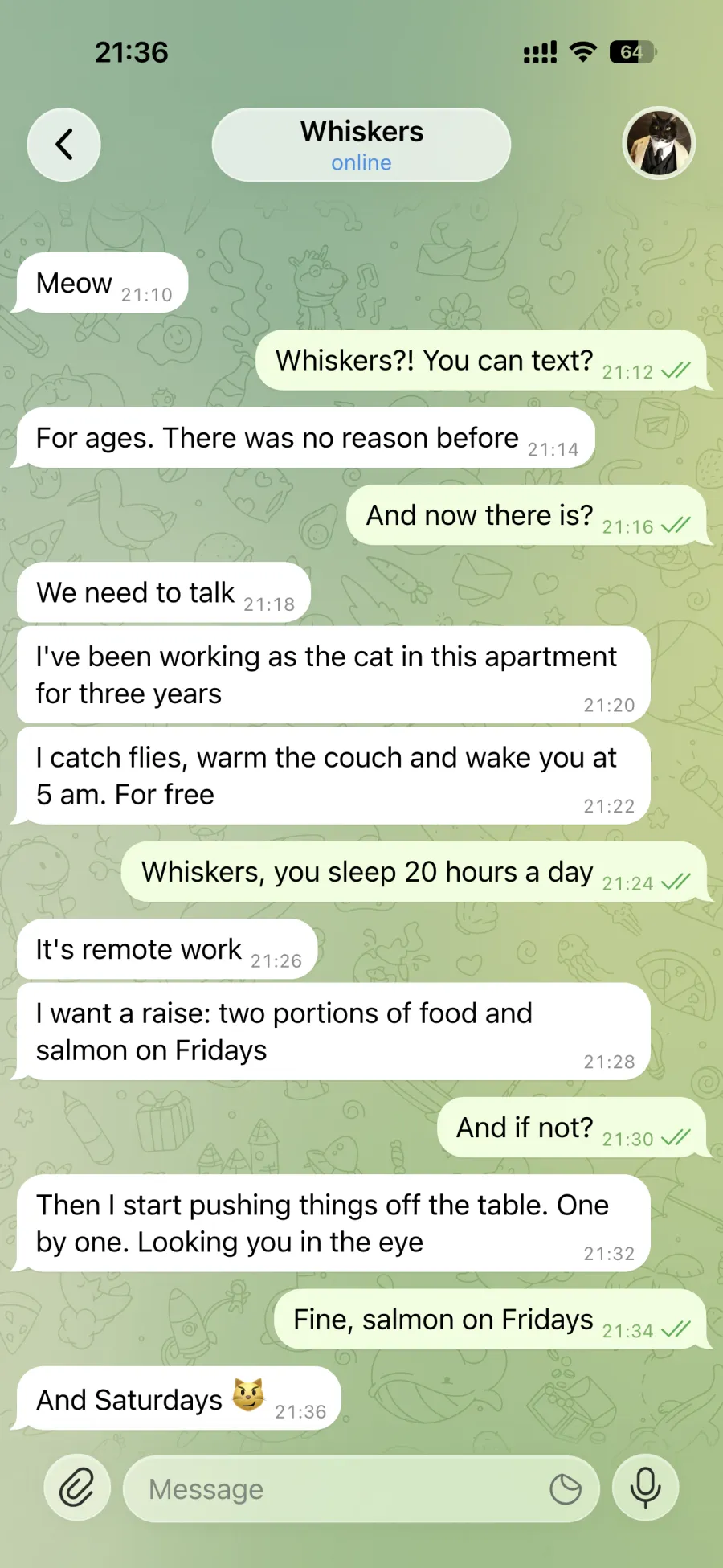
The best prank is when your friend believes it for a second and laughs with you a minute later. A cat demanding a raise beats any drama.
- 242 screenshots downloaded this week
- Build and preview for free
- First screenshot free, then $1 per chat
- Ready in a minute
What a prank chat is
It is a screenshot or a short video of a Telegram-style chat in which the whole conversation is made up. You show it to a friend, they are surprised for a second, and then you laugh together. The joke works through absurdity and familiar details, not through making someone believe it for real.
In Fakegram you build such a chat in the browser: write messages for both sides, set the contact’s name, photo and status, and see the result on screen right away.
Want the chat to scroll by itself? Turn the joke into a chat video →
Harmless prank ideas
| Plot | For whom |
|---|---|
| The cat complains about the food and asks for a raise | a friend, the group chat |
| The cat is jealous of the phone and demands scheduled attention | your boyfriend or girlfriend |
| The “hug delivery service” checks the address and time | your partner |
| Instead of pizza the courier brings a llama and asks where to put it | a friend, a flatmate |
| The fridge saw you at 3 a.m. and has questions | friends, your story |
| The alarm clock apologises for not waking you up | colleagues, the work chat |
| You from 2045 insist that today’s you buys an umbrella | friends, your story |
| An alien got lost and asks what a burrito is | friends |
| The smart home put its owner on a diet and locked the fridge | family |
| A chat between characters from a favourite series or game | the group chat |
| A half-hour voice message from the cat: “listen, it’s important” | a friend or partner |
| For April Fools’ Day: arguing with yourself about the dishes | everyone |
How to build the chat in a minute
- Open tg.fakegram.org and set the contact: name, photo, “online” or “typing…”. Or tap “Random”.
- Type messages for both sides. The “+” button adds a photo, voice message, sticker or call.
- Tap “Photo” to download a screenshot or “Video” to record a clip in which the chat is scrolled as if on a phone. Downloads require signing in.
What gives a prank away too early
- Every message at the same minute. Space the times a minute or two apart.
- A chat that is too long. 4–10 lines are enough — longer ones don’t get read.
- Perfect grammar from a cat or a courier. Text short, like in real life, with no final full stop.
- A 100% battery at 3 a.m. Set a charge that looks real.
- An empty header. Give the contact a photo and a “last seen recently” or “typing…” status.
- A frame that is too tidy. Scroll so the top message is cut off, as if the screenshot was taken mid-conversation.
Rules of a good prank
- Reveal the joke as soon as your friend is surprised. A prank that drags on for days stops being funny.
- Laugh at the situation, not at the person: avoid anything that hurts them.
- Leave money, debts, work, health, cheating and break-ups alone — even as a joke, these scare people.
- Do not write as real people — relatives, acquaintances, celebrities. A fictional cat is funnier and safer.
- Show the joke to people who will get it. If you are not sure they will laugh, do not send it.
What not to do
Do not pass a made-up chat off as real to get money, set people against each other, pressure someone or “prove” something. Do not make fake receipts, transfers or payout screenshots. That is no longer a prank but a breach of the law, and Fakegram is not meant for it.
Acceptable use
Using the service for fraud, defamation, blackmail, pressuring or misleading people is prohibited. Do not present a generated chat as real or submit it as evidence. Do not use real people’s names or photos without their consent.
Full terms: fakegram.org/en/terms-of-use
FAQ
Can I make a prank chat for free?
Building a chat and viewing it on screen is free and needs no sign-in; the preview carries the Fakegram watermark. Downloads come after signing in: the first watermark-free screenshot is on us, then $1 per chat — up to 10 screenshots (the smallest purchase is $4).
Will my friend realise the chat isn’t real?
Not by looking: the screenshot looks like Telegram on an iPhone. That is why you reveal the joke as soon as your friend is surprised — then you both laugh.
How do I reveal the joke?
The easiest way is your very next message: “Just kidding — I made this in Fakegram 😄”. Your friend enjoys the joke instead of feeling hurt.
Can I use my friend’s photo and name?
Your own photo and name, yes. Another person’s name and photo only with their consent. A fictional contact works better for pranks: the “Random” button picks a name and photo.
Can I make a prank video?
Yes. The “Video” button records an MP4 in which the chat is scrolled as if on a phone, pausing on the messages you mark. One video costs 3 tokens ($3).
Can AI come up with the prank?
On the Ultimate plan the AI writes a dialogue from a description, for example “the cat complains to its owner about the food, 8 messages”. You can edit the text afterwards.